

Most money apps answer a question nobody asks at eight in the morning: “How did you do against your budget?” The question people do ask is simpler. Can I afford this coffee, this taxi, this pair of shoes, without running short before payday?
Expense Diary answers that with a single number on its first screen. It is called safe to spend, and this is how it is worked out.

The idea in one sentence
Take the money you have, hold back what already has a name on it, and spread what is left over the days until you are paid again.
That is the whole formula. Everything below is detail.
Step 1: the money you have
The app adds up the balances of your everyday accounts: the current account, the cash in your wallet, a spending card. Savings, investments and credit cards are left out on purpose. Savings are not for Tuesday’s lunch, and a credit limit is not money.
You choose which accounts count. The switch is on each account in Settings.
Step 2: what is already spoken for
Three things are held back before you see a figure:
- Bills due before payday that you have not ticked off yet. Rent on the first, the phone on the twelfth, the gym on the twentieth. Once a bill is marked paid, its money has left the account and it stops being held back, so nothing is counted twice.
- This month’s planned jar contributions, if you have switched that on. Saving for a holiday is a promise to yourself; the app can treat it like a bill.
- A buffer you set once. Fifty pounds, two hundred, whatever lets you sleep. It is never offered up as spendable.

Step 3: spread it over the days left
What remains is safe to spend until payday. Divide it by the number of days from today up to, but not including, payday, and you have safe to spend today.
Payday itself is not counted because payday brings new money. So on the last day before you are paid, the whole of what is left is yours to spend.
A worked example
| In your everyday accounts | £1,240.00 |
| Bills still to pay before payday | − £395.00 |
| Planned jar contribution | − £100.00 |
| Buffer | − £150.00 |
| Safe to spend until payday | £595.00 |
| Days until payday | 17 |
| Safe to spend today | £35.00 |
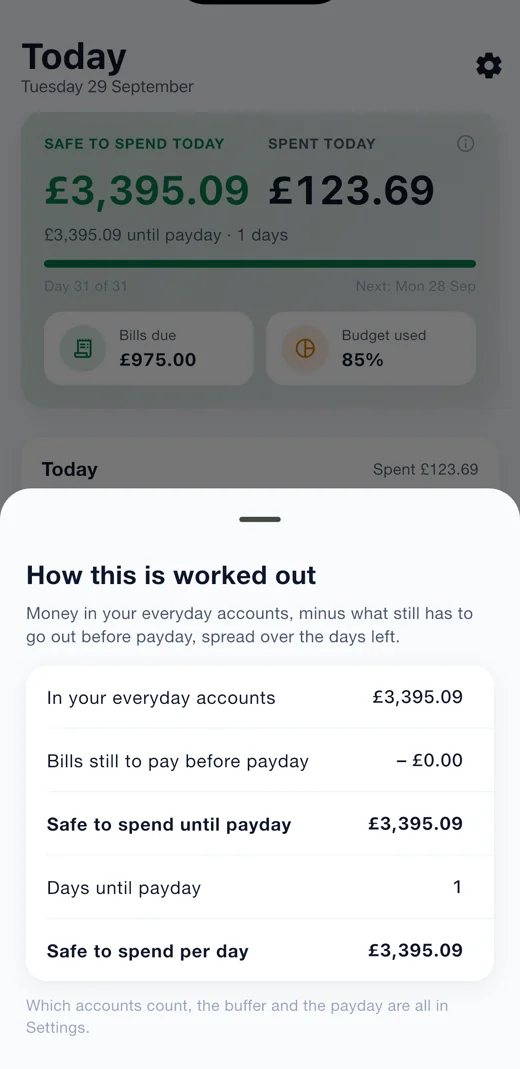
Spend £12 on lunch and the account balance drops by £12, so tomorrow’s figure is a little lower. Tick off the phone bill and £45 leaves both the balance and the held-back total, so the figure barely moves. Skip a day and tomorrow’s share goes up. The number always reflects where you actually are.
What it is not
It is not a budget, and it does not replace one. A budget is a plan for the month by category. Safe to spend is a reading for today, across everything. Expense Diary has both, and they answer different questions: “am I on track with groceries?” and “can I afford this now?”
It is also not a forecast. It does not guess what you will spend. It only knows what you have, what is owed, and how many days are left, and it tells you the truth about those three things.
Why it stays on your phone
Working this out needs your balances, your bills and your payday. Expense Diary asks for none of that from a bank. You type your balance once and log what you spend, or point the camera at a receipt or a statement and let the phone read it. Nothing is uploaded, there is no account, and there is no server that could ever see the figure.
That is a trade. You do a little logging. In return the app knows nothing about you that you did not choose to tell it, and it works exactly the same on a phone with no signal.
See it in three minutes
Try it
Expense Diary is free on Google Play, with the iPhone version on its way. Tap the small i on the Today screen and the app shows you its working for your own numbers, line by line, just like the table above.
More about the app on its page.